标签存档: auto

阿里云Centos配置腾讯SMTP邮箱

which mail
yum -y install mailx
vim /etc/mail.rc

写入:

# mail config
set from=zpmail@wp.cpxiang.tech 
set smtp=smtps://smtp.qq.com:465  
set smtp-auth-user=1324928751
set smtp-auth-password=<授权码> 
set smtp-auth=login 
set nss-config-dir=/root/.certs  
set ssl-verify=ignore
mkdir -p /root/.certs
echo -n | openssl s_client -connect smtp.qq.com:465 | sed -ne '/-BEGIN CERTIFICATE-/,/-END CERTIFICATE-/p' > ~/.certs/qq.crt
certutil -A -n "GeoTrust SSL CA" -t "C,," -d ~/.certs -i ~/.certs/qq.crt
certutil -A -n "GeoTrust Global CA" -t "C,," -d ~/.certs -i ~/.certs/qq.crt
cd /root/.certs/
certutil -A -n "GeoTrust SSL CA - G3" -t "Pu,Pu,Pu" -d ./ -i qq.crt
echo "hallo" | mail -v -s "this is Test Mail" 1324928751@qq.com
监测阿里云CentOS服务器的shell脚本

#!/bin/bash
function cpu() {
    NUM=1
    while [ $NUM -le 3 ]; do
        util=`vmstat |awk '{if(NR==3)print 100-$15"%"}'`
        user=`vmstat |awk '{if(NR==3)print $13"%"}'`
        sys=`vmstat |awk '{if(NR==3)print $14"%"}'`
        iowait=`vmstat |awk '{if(NR==3)print $16"%"}'`
        echo -e "CPU - 使用率:"$util",等待磁盘IO响应使用率:"$iowait
        let NUM++
        sleep 1
    done
}

function memory() {
    total=`free -m |awk '{if(NR==2)printf "%.1f",$2/1024}'`
    used=`free -m |awk '{if(NR==2) printf "%.1f",($2-$NF)/1024}'`
    available=`free -m |awk '{if(NR==2) printf "%.1f",$NF/1024}'`
    echo "内存 - 总大小: ${total}G , 使用: ${used}G , 剩余: ${available}G"
}

function disk() {
    fs=$(df -h |awk '/^\/dev/{print $1}')
    for p in $fs; do
        mounted=$(df -h |awk '$1=="'$p'"{print $NF}')
        size=$(df -h |awk '$1=="'$p'"{print $2}')
        used=$(df -h |awk '$1=="'$p'"{print $3}')
        used_percent=$(df -h |awk '$1=="'$p'"{print $5}')
        echo -e "硬盘 - 挂载点:"$mounted",总大小:"$size",使用:"$used",使用率:"$used_percent
    done
}

function tcp_status() {
    summary=$(ss -antp |awk '{status[$1]++}END{for(i in status) printf i":"status[i]" "}')
    echo "TCP连接状态 - $summary"
}

function 80_port(){
    apa=`netstat -tanpl | grep 80 | awk '{print $4}' | sed -n '1p'`
    if [ $apa != "0.0.0.0:80" ];then
        echo "80端口已经停止运行"
    else
        echo "80端口运行正常"
    fi
}

echo -e $(cpu)"\n"$(memory)"\n"$(disk)"\n"$(tcp_status)"\n"$(80_port) | mail -s "huacai服务器状态" 1324928751@qq.com

Ubuntu通过mail发送邮件

先修改/etc/s-nail.rc中来添加外部SMTP服务器如下:

set from=zpmail@wp.cpxiang.tech
set smtp="smtps://smtp.qq.com:465"
set smtp-auth=login
set smtp-auth-user=1324928751
set smtp-auth-password=<授权码>

尝试发送

echo "nihao" | mail -s "test" 1324928751@qq.com

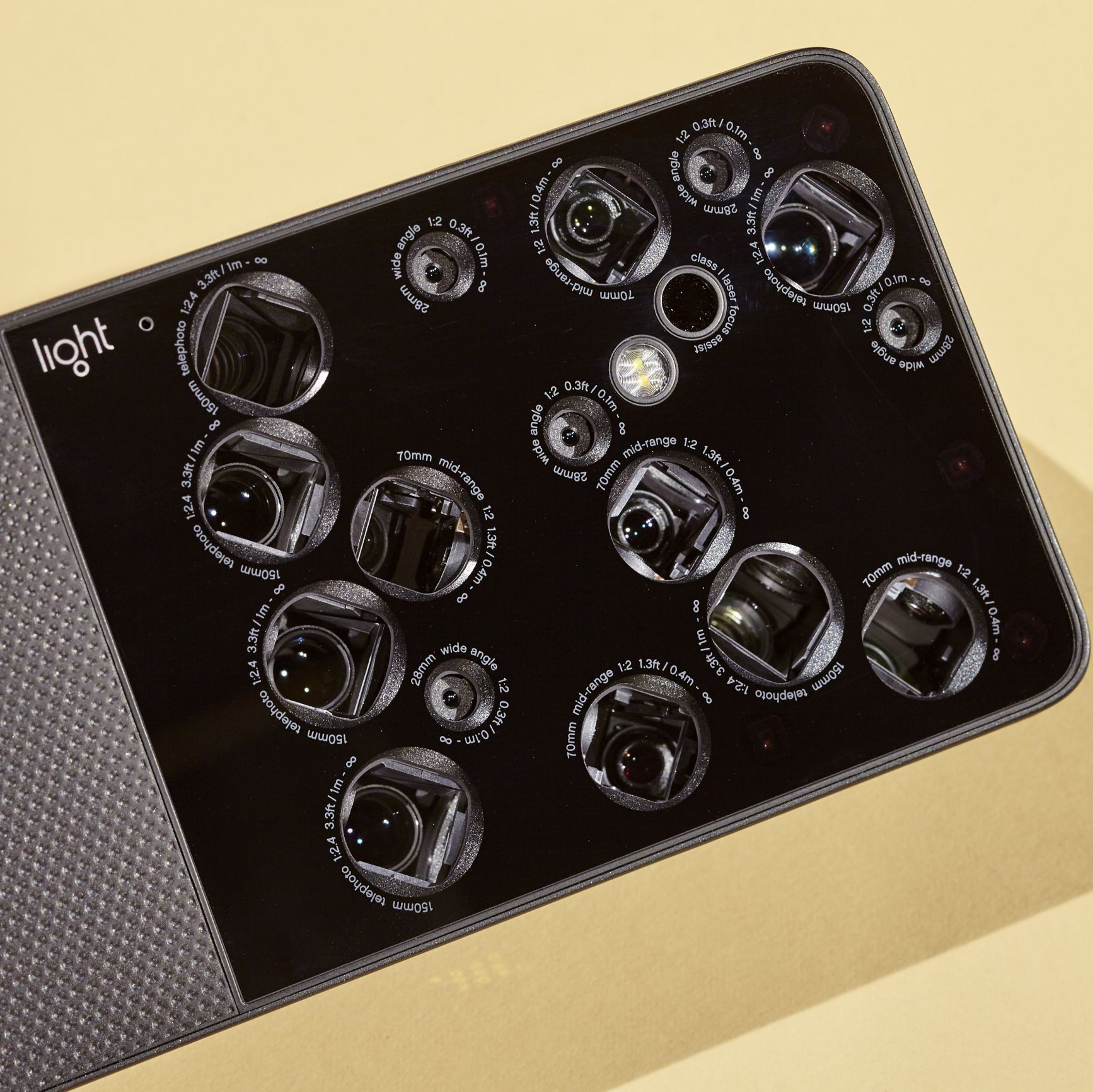
Light开卖16个摄像头的相机

1511962789460364.jpg

近年来,相机镜头的设计已经日渐趋同,但是一家名叫Light的公司,却推出了一款超级不一样的全新相机,它就是L16。Light秉承创始人Rajiv Laroia在摄影界所倡导的“无声革命”。正如其名,该相机配备了16个摄像头(另外还有一个红外传感器)。

体验Google翻译的正确性

下面这段英文摘自英语维基百科 Google Earth 3D imagery:

Google Earth shows 3D building models in some cities, including 
photorealistic 3D imagery. The first 3D buildings in Google 
Earth were created using 3D modeling applications such as 
SketchUp and, beginning in 2009, Building Maker,[19] and 
were uploaded to Google Earth via the 3D Warehouse. In June 
2012, Google announced that it would be replacing user-generated 
3D buildings with an auto-generated 3D mesh.[20] This would be 
phased in, starting with select larger cities, with the notable 
exception of cities such as London and Toronto which required 
more time to process detailed imagery of their vast number of 
buildings. The reason given is to have greater uniformity in 
3D buildings, and to compete with Nokia Here and Apple Maps, 
which were already using this technology. The coverage began 
that year in 21 cities in four countries.[21] By early 2016, 
3D imagery had been expanded to hundreds of cities in over 40 
countries, including every U.S. state and encompassing every 
continent except Antarctica.
In 2009, in a collaboration between Google and the Museo del 
Prado in Madrid, the museum selected 14 of its paintings to 
be photographed and displayed at the resolution of 14,000 
megapixels inside the 3D version of the Prado in Google Earth 
and Google Maps.[22][23]

经过 https://translate.google.cn  翻译后:

`4]EXJ[{4O{}F9K({]2~A0M.png

可见Google翻译对自然语言处理的准确度还是非常高的。