标签存档: PHP - 第6页

PHP通用自定义分页处理

①、先下载page.txt,更名为page.php。

②、用法(假设page.php已经被引用包含)

	if($_GET['action']=='all'){
		
		$cp = empty($_GET['p'])?1:$_GET['p'];//当前页码
		
		$rows = getrows($dbh,'posts');
		//echo "共有".$rows."行数据</br>";
		
		$pnums = get_all_pp($rows,$ppgs=5);//总页数
		//echo "总页数是:".$pnums."</br>";
		
		$pi = get_pi($cp,$ppgs=5);//limit $pi,$ppgs;
		//echo "当前limit:".$pi.",$ppgs</br>";
		
		$pv = 6;//定义可见的页码数量,$pv>0;
		
		$list_posts = get_data($dbh,'posts',$req=array(),$or='id',$ory='desc',$pi,$ppgs=5);
		
		$sp_html = xp_html($cp,$pv,$pnums,$dir,$admin=1,$php='do');
		
		//echo $sp_html."</br>";
		view($html="list",array('data'=>$data,'pghtml'=>$sp_html,'list_posts'=>$list_posts),'admin/',$dir);	
	}

③、关于view函数

//视图层模板控制
function view($html='index',$dt=array(),$admin,$dir=""){
	extract($dt);
 	/*if($admin == 'admin/'){
	         $xml = 	sim_load_xml();
	 } */
	//echo TEMPLATES_PATH.$admin.$dir.'/'.$html.'.html';
	include(TEMPLATES_PATH.$admin.'top.html');
	if($dir=='admin'){
		include(TEMPLATES_PATH.$admin.$html.'.html');
	}else{
		include(TEMPLATES_PATH.$admin.$dir.'/'.$html.'.html');		
	}
	include(TEMPLATES_PATH.$admin.'footer.html');
 }

④、效果(注意分页显示的样式)
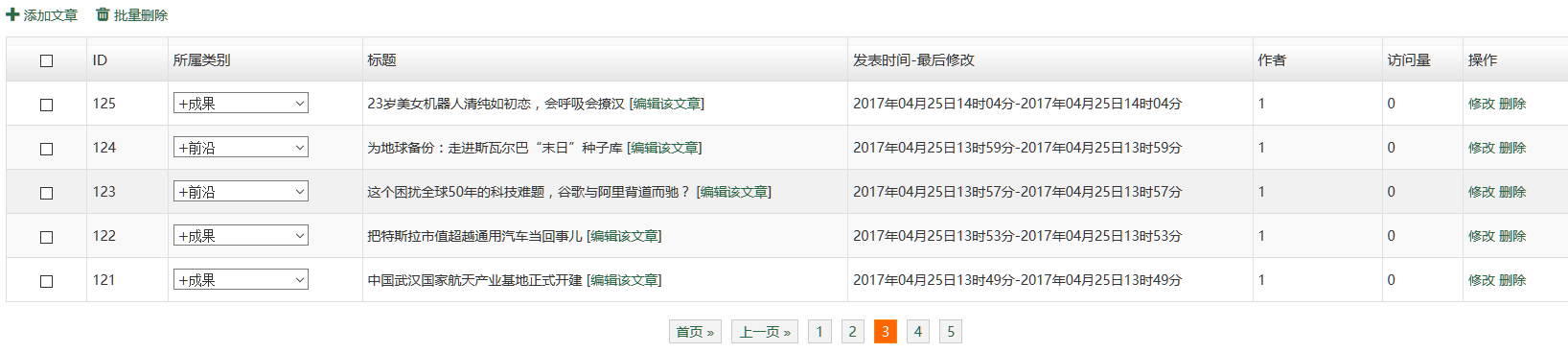
I`5AI$@AIUBPGY}SDH%T@$L.png

用PDO同时向MySQL插入多条数据

①、先看控制器层的业务逻辑

if($_POST){
		
	foreach($_FILES['fileinfo'] as $key=>$value){// $key value:name,type,tmp_name,error,size
		foreach($value as $ke=>$val){     // $ke value:1 2 3 4
			$arr[$ke][$key] = $val;
		}
	}
		
	$files_type=array("audio","video","image"); 
	
	foreach($arr as $k=>$v){
		if(!in_array(substr($v['type'],0,5),$files_type) || $v['size'] >= 8*1024*1024){
			echo "不支持".$v['name']."文件类型上传或文件尺寸大于8M";
			unset($arr[$k]);
		}else{
			$arr[$k]['utime'] =  time();	
			$arr[$k]['uid'] = $_SESSION['userid'];
		}	
	}
	
	
	if(!insert_multi($dbh,'media',$arr))
	{
		die("上传失败!");
	}
		
	view($html="list",array('data'=>$data),'admin/',$dir);	
}

②、模型层的业务逻辑

//通用多条插入
//insert into $table(param1,parm2,param3) values(value1,value2,value3),(value1,value2,value3);  
function insert_multi($dbh,$table,$data=array()){//$data['post']=$_POST;$data['files']=$arr;		
	//print_r($data);	
	foreach($data as $key=>$value){
		foreach($value as $ke=>$val){			
			//$data[$key]['id'] = null;			
			if($ke=='type'){
				$data[$key]['types']= $val;
				unset($data[$key][$ke]);
			}
			if($ke=='tmp_name'){
				$data[$key]['bin']= mysql_real_escape_string(file_get_contents($val));
				unset($data[$key][$ke]);
			}
			if($ke=='error'){
				unset($data[$key][$ke]);
			}		
		}
	}
	//print_r($data);	
	$keystr="";$valstr="";		
	for($i=0;$i<count($data);$i++){	
		//print_r($data[$i]);
 		foreach($data[$i] as $k=>$v){
			if($i==0){
				$keystr .= $k.",";				
			}
			$valstr .= "'".$v."',";	
		}
 		$valstr = substr($valstr,0,-1)."),(";  
	}
	
	$sql = "insert into $table(".substr($keystr,0,-1).") values(".substr($valstr,0,-2); 		
	//print_r($sql);
	return $dbh->query($sql);
}

PDO使用初探

PDO一是PHP数据对象(PHP Data Object)的缩写。

连接是通过创建 PDO 基类的实例而建立的。不管使用哪种驱动程序,都是用 PDO 类名。

<?php
$dbh = new PDO('mysql:host=localhost;dbname=test', $user, $pass);?>

注意:如果有任何连接错误,将抛出一个 PDOException 异常对象。

处理链接错误

<?phptry {
    $dbh = new PDO('mysql:host=localhost;dbname=test', $user, $pass);
    foreach($dbh->query('SELECT * from FOO') as $row) {
        print_r($row);
    }
    $dbh = null;} catch (PDOException $e) {
    print "Error!: " . $e->getMessage() . "<br/>";
    die();}
?>

连接数据成功后,返回一个 PDO 类的实例给脚本,此连接在 PDO 对象的生存周期中保持活动。

要想关闭连接,需要销毁对象以确保所有剩余到它的引用都被删除,可以赋一个 NULL 值给对象变量。

如果不这么做,PHP 在脚本结束时会自动关闭连接。

关闭一个链接

<?php
$dbh = new PDO('mysql:host=localhost;dbname=test', $user, $pass);// 在此使用连接


// 现在运行完成,在此关闭连接
$dbh = null;?>

很多 web 应用程序通过使用到数据库服务的持久连接获得好处。

持久连接在脚本结束后不会被关闭,且被缓存,当另一个使用相同凭证的脚本连接请求时被重用。

持久连接缓存可以避免每次脚本需要与数据库回话时建立一个新连接的开销,从而让 web 应用程序更快。

持久化链接

<?php
$dbh = new PDO('mysql:host=localhost;dbname=test', $user, $pass, array(
    PDO::ATTR_PERSISTENT => true));?>

注意如果想使用持久连接,必须在传递给 PDO 构造函数的驱动选项数组中设置 PDO::ATTR_PERSISTENT 。如果是在对象初始化之后用 PDO::setAttribute() 设置此属性,则驱动程序将不会使用持久连接。

和mysql_connect()对比

<?php                   
define("dbt","mysql");
define("host","localhost");
define("port","3306");
define("user","root");
define("pwd","123456");
define('dbname','cms');
define("dsn",dbt.":host=".host.";dbname=".dbname);
//function conn_db(){//version 5.5 and older for this : mysql_connect()
//      $conn = mysql_connect(url,user,pwd);
//      if($conn){
//              $db_rs = mysql_select_db(dbname,$conn);
//              if(!$db_rs){die("no connection".mysql_error());}
//      }else{
//              die("no connection".mysql_error());
//      }
//      mysql_query("set names UTF8");  
//}
//conn_db();
try{
        $dbh=new PDO(dsn,user,pwd);
        echo print_r($dbh)."</br>connection success!</br>";
        
        //close
        $dbh=null;
}catch(PDOException $e){
        die("Error!:".$e->getMessage()."</br>");
}
//print_r(dsn);
?>


参考: PDO参考手册


手工切换ubuntu16.04不同版本PHP

如果需要更新源:

#vim  /etc/apt/sources.list

在末尾加入

# deb cdrom:[Ubuntu 16.04 LTS _Xenial Xerus_ - Release amd64 (20160420.1)]/ xenial main restricted
deb-src http://archive.ubuntu.com/ubuntu xenial main restricted #Added by software-properties
deb http://mirrors.aliyun.com/ubuntu/ xenial main restricted
deb-src http://mirrors.aliyun.com/ubuntu/ xenial main restricted multiverse universe #Added by software-properties
deb http://mirrors.aliyun.com/ubuntu/ xenial-updates main restricted
deb-src http://mirrors.aliyun.com/ubuntu/ xenial-updates main restricted multiverse universe #Added by software-properties
deb http://mirrors.aliyun.com/ubuntu/ xenial universe
deb http://mirrors.aliyun.com/ubuntu/ xenial-updates universe
deb http://mirrors.aliyun.com/ubuntu/ xenial multiverse
deb http://mirrors.aliyun.com/ubuntu/ xenial-updates multiverse
deb http://mirrors.aliyun.com/ubuntu/ xenial-backports main restricted universe multiverse
deb-src http://mirrors.aliyun.com/ubuntu/ xenial-backports main restricted universe multiverse #Added by software-properties
deb http://archive.canonical.com/ubuntu xenial partner
deb-src http://archive.canonical.com/ubuntu xenial partner
deb http://mirrors.aliyun.com/ubuntu/ xenial-security main restricted
deb-src http://mirrors.aliyun.com/ubuntu/ xenial-security main restricted multiverse universe #Added by software-properties
deb http://mirrors.aliyun.com/ubuntu/ xenial-security universe
deb http://mirrors.aliyun.com/ubuntu/ xenial-security multiverse

#apt-get update

#apt-get upgrade

#apt-get install php5

如果需要安装依赖

# apt-get install php5-fpm php5-gli php5-cgi libapache2-mod-php5filter libapache2-mod-php5

#apt-get install php5

停用原来版本

#a2dismod php7 

启用刚安装的版本

#a2enmod php5

#service apache2 restart

最后用phpinfo()检查

WP安装或恢复问题集合

一、运行环境

        1.mysql php5 apache2安装

sudo apt-get update #更新安装源
sudo apt-get install mysql-server mysql-client php5 apache2

        2.让mysql支持更大的SQL statement

mysql>show global variables like 'max_allowed_packet';
mysql>set global max_allowed_packet=1024*1024*16;

        3.启用apache2的rewrite_module

sudo a2enmod rewrite  #开启Rewrite模块#停用模块,使用 a2dismod
vim  /etc/apache2/apache2.conf

         将AllowOverride None修改为AllowOverride All

sudo /etc/init.d/apache2 restart  #重启apache2

二、wordpress设置

        1.如果有域名更换或将wordpress迁移到其他服务器则需要替换网站中的URL

                个人建议用notpad++进行*.*全文替换 

        2.先恢复mysql

sudo mysql -u -p data<data.sql #备份sudo mysqldump -u -p data>data.sql

        3.更改固定连接

                设置固定连接为伪静态模式,请参考固定链接设置的几种方法,改成伪静态后,有利于进一步设置页面缓存

        4.添加.htaccess

<IfModule mod_rewrite.c>
    RewriteEngine On
    RewriteBase /
    RewriteRule ^index\.php$ - [L]
    RewriteCond %{REQUEST_FILENAME} !-f
    RewriteCond %{REQUEST_FILENAME} !-d
    RewriteRule . /index.php [L]
</IfModule>

        5.下载缓存插件并激活使用

                如果要恢复带有正在处于激活状态缓存插件的wordpress,请删除该插件,然后再重新安装激活使用